

A single order entered by the sales team updates inventory, triggers the invoice, and feeds financial reporting without any double entry. This is the promise of an ERP (Enterprise Resource Planning) system. To fully grasp this concept, our article on ERP software definition sets the groundwork before starting any project.
The term ERP software refers to an integrated management suite capable of connecting all departments around a single source of truth. This is no technical gimmick: the global ERP software market reached $59.42 billion in 2025, with an expected annual growth rate of 7.1%. In other words, these platforms have become essential for structuring growth.
What is an ERP and what is it used for?
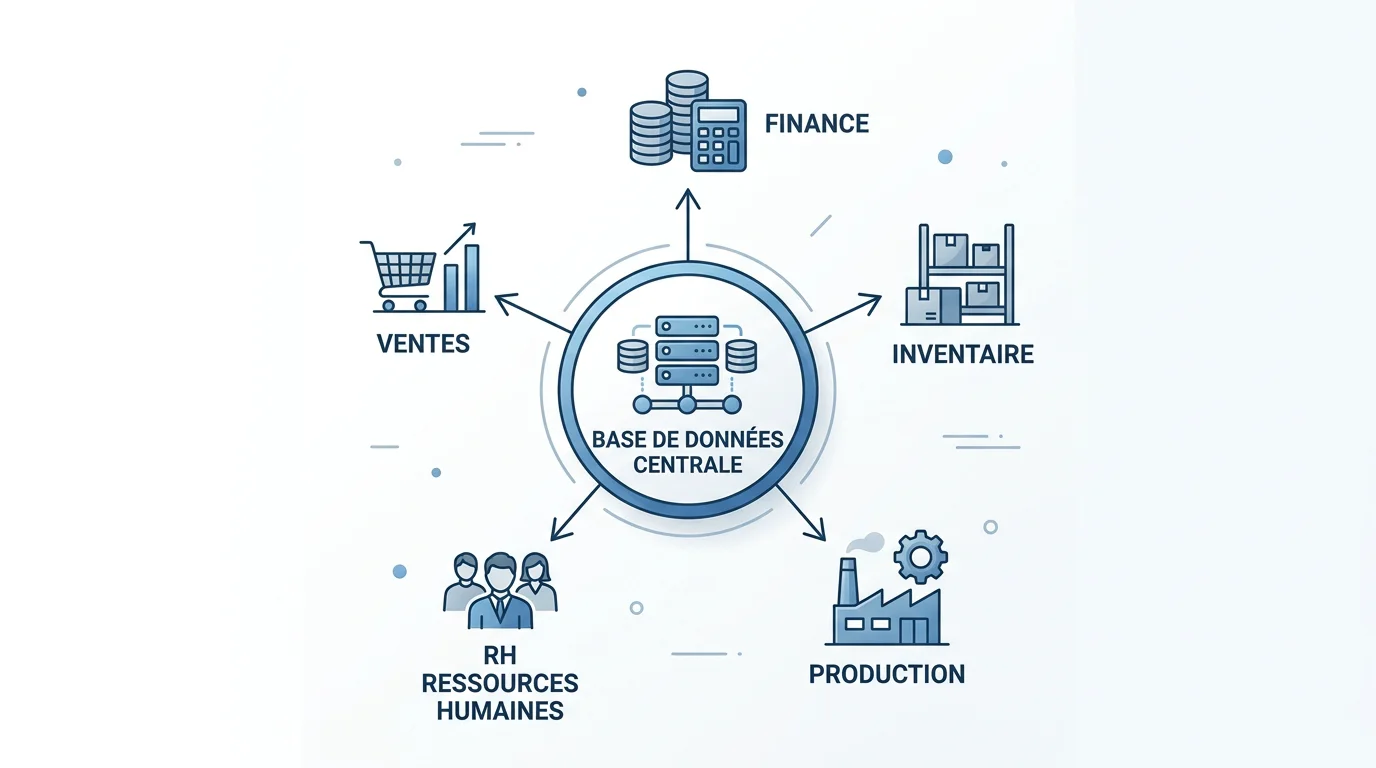
An integrated management software package brings together typically scattered functions into a single system: accounting, purchasing, inventory management, production, sales, and human resources. Each module shares the same database. As a result, duplicate information disappears and data integrity is guaranteed.
Concretely, an ERP acts as the company's nerve center. It collects shared transactional data and makes it accessible to each department, with customized access rights. No more disconnected spreadsheets and contradictory versions of the same metric.
This centralization benefits organizations of all sizes. In Switzerland and France alike, industrial SMEs, service providers, and large multi-site groups find in it a common foundation to manage their business in real time.
How does ERP software work?
The principle relies on a single, defined data structure, typically a shared database. Information is standardized and based on definitions shared across all departments.
Let's take a simple example. A part or component must have the exact same name, code, and attributes throughout the system. Without this consistency, it is impossible to know how much you are actually spending with a supplier or to negotiate effectively.
A modern ERP does not live in isolation. It communicates with your other tools: CRM, logistics platforms, and business-specific software. The quality of these connections determines overall workflow fluidity, which is the core focus of our ERP integration approach to prevent process disruptions.
The main modules of an ERP
An ERP consists of functional blocks that can be activated based on your needs. You can start with a few modules and add more as your business grows. Here are the most common ones:
- Accounting and Finance: general and analytical accounting, invoicing, cash management, budgeting, and reporting.
- Inventory Management and Logistics: tracking ins and outs, inventory levels, warehousing, and shipping.
- Purchasing and Procurement: purchase orders, receipts, cost and lead-time analysis.
- Production (MRP): material requirements planning, manufacturing orders, quality control, and traceability.
- Human Resources: personnel administration, payroll, leave management, skills, and training.
- CRM and Sales: quotes, sales orders, customer relationship tracking, and after-sales service.
- Business Intelligence: dashboards, KPIs, and analytics for fast, informed decision-making.
These ERP modules can be deployed all at once or progressively. The key is to choose those that bring the most value to your high-priority processes.
Cloud, On-Premise, or Hybrid: What Types of ERP exist?
The deployment model changes everything: costs, security, maintenance, and scalability. Three main types coexist today, in 2026.
- On-premise ERP: installed on your own servers. Full control over data, but infrastructure and maintenance are your responsibility.
- Cloud ERP (SaaS): hosted and accessible via the internet, with automatic updates. Fast deployment and predictable, spread-out costs.
- Hybrid ERP: a combination of both, keeping certain sensitive data on-site while taking advantage of cloud flexibility.
The shift to the cloud dominates the current market dynamics. Cloud adoption accounts for a major share of market growth: according to an industry analysis, it explains 61% of this expansion, ahead of digital transformation and automation. For a Swiss company without a full-time CIO, SaaS significantly reduces the technical overhead.
Why implement an ERP in your company?
Why invest in such a system? Because the benefits affect the entire organization, from ground operations to executive management. Here are the key advantages:
- Automation of repetitive tasks: orders, billing, follow-ups, and reporting.
- Reduced operating costs through improved visibility into inventory and workflows.
- Faster decision-making based on reliable, real-time data.
- Enhanced collaboration around a single source of truth, removing duplicates and inconsistencies.
With us, this automation takes concrete shape: quotes, invoices, payment reminders, and approvals are executed automatically to lighten your teams' workload. The goal is never technology for its own sake, but rather a measurable productivity gain.
Successful Implementation: The Real ERP Challenge
Here is the truth that many articles downplay: deploying an ERP is risky. The numbers are stubborn. According to Gartner and McKinsey, ERP project failure rates exceed 70%. A deployment is not just a technical project; it is an organizational transformation that impacts every department.
Overruns mainly affect timelines and budgets. According to Panorama Consulting, 42% of ERP projects exceed their schedule and 23% to 45% run over budget. The cause is almost never the software itself, but rather a lack of framing, governance, and change management.

Successful projects share common traits: scoping tied to measurable goals, active executive sponsorship, and a phased rollout. This is exactly how we structure our ERP implementation methodology, with a target ROI and a dedicated expert for each phase.
How to choose the right ERP solution?
The choice should not be made lightly. It determines the efficiency and sustainability of your operations. A few key criteria should guide your decision.
- Your actual needs: map your processes and identify high-priority modules.
- Flexibility: opt for a modular system that can evolve with your company.
- Integrations: verify the connection with your existing tools (CRM, logistics, business software).
- Total cost of ownership (TCO): licenses, SaaS subscriptions, installation, maintenance, and training.
- Support: responsive assistance often makes the difference between success and abandonment.
The market remains robust and expansive: analysts project sustained growth until 2035, driven by digitization and AI, as highlighted in a report by Research Nester. To compare options based on your industry, rely on our comparison of the best ERPs rather than just vendor brand recognition.
| Criterion | Standard Market ERP | Our SapAngel Approach |
|---|---|---|
| Time to market / Delivery time | Often long, frequent delays | Bespoke software delivered in 3 months at a fixed price |
| Code and data ownership | Vendor lock-in / dependence | 100% ownership of code and data |
| Project management | Variable | Measurable target ROI and dedicated expert |
| Hosting | Depending on the offer | In Europe, encrypted, and GDPR-compliant |
Key Takeaways on ERP
An ERP system remains the foundation that unifies your data and streamlines your processes, from accounting to production. But the value does not come from the tool alone: it stems from rigorous scoping, a progressive rollout, and proper change management. Before you start, clarify your goals, prioritize your modules, and assess the total cost of ownership over several years. A well-prepared project turns a risk into a sustainable growth engine.
Take Action with SapAngel
Do you need to manage a critical ERP project without a full-time CIO, or do you lack the resources to scope the project? That is precisely where we step in for SMEs and mid-market companies in Switzerland and France to secure your timelines and budgets.
With over 20 years of experience and 40+ supported clients, we structure your projects with a target ROI and a dedicated advisor. Discover our SAP Consulting and Audit services and take 30 minutes to define the best approach for your project together.
Frequently Asked Questions
What is the difference between an ERP and a CRM?
A CRM focuses on customer relationship management: prospects, sales, and customer service. An ERP covers a broader scope, including finance, purchasing, inventory, and production. In fact, a CRM is often a module within an ERP.
Are ERP systems only for large companies?
No. Modular and scalable solutions exist for small and medium-sized businesses (SMBs). They allow companies to centralize data and automate tasks without dealing with the complexity of an enterprise-level group.
How much does ERP software cost?
The cost varies based on company size, the number of users, modules, and deployment type. A cloud ERP subscription spreads out costs, while a custom solution is based on a project budget. Always consider the total cost of ownership (TCO) over several years.
How long does it take to implement an ERP?
It depends on the scope and level of customization. A phased rollout limits disruptions. With us, custom software is delivered in 3 months at a fixed price, which speeds up adoption.
Cloud vs. on-premise: which to choose?
Cloud hosting offers fast deployment, automatic updates, and reduced infrastructure management. On-premise grants total control over your data. Hybrid combines both, depending on your security and flexibility requirements.