


How many hours do your teams waste every week re-entering the same data into disconnected spreadsheets? The answer alone often justifies adopting an integrated management system. To map out the challenges before you start, you can consult our guide on choosing the best ERP.
The topic goes far beyond IT. Understanding the definition of ERP software means grasping how to connect still-siloed departments around a single source of truth. In 2026, these tools structure both growing Swiss SMEs and large multi-site corporations. This article details what an ERP is, how it works, the benefits it delivers, and how to choose the right one.
What is ERP software? The Definition
The search term "erp software definition" often comes up among leaders dealing with systems that don't communicate with each other. In practice, an Enterprise Resource Planning (ERP) system is software that gathers all of an organization's key functions within a single system: accounting, procurement, inventory, sales, production, and human resources.
Its founding principle is simple. Instead of a multitude of isolated databases and scattered Excel sheets, an ERP relies on a single database. Any information entered once is available everywhere, without duplication or re-entry. When an order is registered by the sales department, inventory levels update, and invoicing is triggered automatically.
This is why an ERP is often described as the backbone of the information system. It is not just a technical tool, but a common source of truth that aligns people, processes, and data around shared goals.
How Does an ERP Work in Everyday Practice?
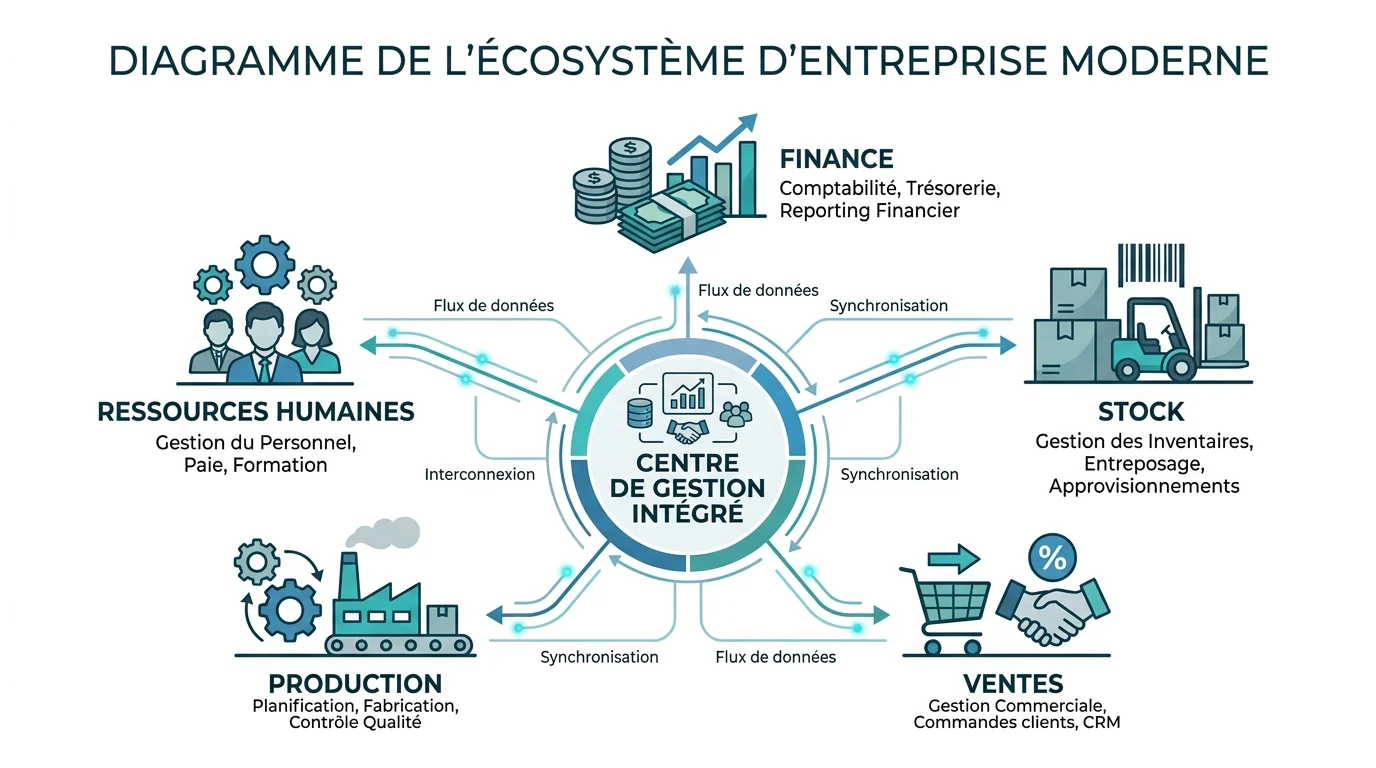
An ERP is organized around business modules connected to a common core. Each module covers a specific area but shares the same data structure. This architecture ensures that terms like "customer" or "item" mean exactly the same thing from one department to another.
Take a manufacturer buying components from several suppliers. Without an ERP, the same part might be named differently across three distinct software tools, making cost tracking impossible. With an integrated system, each item has a unique ID, tracked from purchase to payment.
Automated workflows then link these modules: approving an expense, triggering replenishment, or generating a report. The result is real-time visibility, allowing management to steer operations based on reliable data rather than estimates.
The Core Modules of an ERP System
Not all ERPs are the same, but certain modules form a near-universal foundation. Financial management remains the most common starting point. According to a compilation of industry data, finance and accounting make up the most widely used module, adopted by roughly 95% of equipped organizations.
Next come logistics and commercial functions. According to the same source, inventory and warehouse management feature in nearly 69% of deployments, sales and CRM in about 65%, procurement in 61%, and human resources in 58%. This hierarchy reflects clear priorities.
- Financial Management: accounting, cash management, budgeting, period closing, and regulatory reporting.
- Supply Chain & Inventory: procurement, stock-taking, traceability, and logistics.
- Sales Management & CRM: quotes, orders, invoicing, and a 360-degree customer view.
- Production: scheduling, bills of materials (BOM), manufacturing orders, and quality control.
- Human Resources: payroll, leave, absences, and talent management.
Why Adopt an ERP? The Concrete Benefits
An ERP is justified by measurable gains, not just by being modern. By unifying data, it eliminates re-entry, reduces errors, and frees up time for high-value tasks. Collaboration improves because every department works with the same up-to-date information.
These benefits are driven by a rapidly expanding market. According to data compiled by DocuClipper, the global ERP software market was valued at $50.57 billion in 2023 and is projected to reach $123.41 billion by 2032, representing an annual growth rate of approximately 10.4%. This momentum reflects growing adoption across businesses of all sizes.
For an SME, the benefit is especially clear: structuring growth without multiplying isolated tools. If you manage a small or medium-sized company, our dedicated article details key use cases in our ERP for SMEs analysis.
Cloud, On-Premise, or Custom: Which Model to Choose?

The deployment method shapes your costs, flexibility, and autonomy. The cloud (SaaS) has become the industry standard: the vendor hosts and updates the software, which is accessed via a web browser. According to the same industry data, over 70% of ERP deployments were cloud-based in 2024.
This shift goes hand-in-hand with an already mature global adoption rate. According to statistics recorded by Quantumrun, about 57% of companies that could benefit from an ERP currently use one, a rate that climbs to 90% for very large organizations with over 5,000 employees.
Yet, a generic proprietary model is not the only path. Custom software avoids vendor lock-in and only includes features you actually need. Here is how the three approaches compare.
| Model | Deployment | Costs | Code Ownership |
|---|---|---|---|
| Cloud ERP (SaaS) | Fast, hosted by the vendor | Recurring subscription, licenses | Vendor |
| On-premise ERP | Slow, internal infrastructure | High initial investment | Vendor (licenses) |
| Mind custom software (us) | Delivered in 3 months at a fixed price | Fixed price, no licenses | 100% yours |
Our Microsoft Dynamics 365 consulting and integration services also support organizations choosing a leading ERP vendor, with end-to-end guidance.
How to Succeed in Implementing an ERP
An ERP project rarely fails for technical reasons. Project drift usually stems from insufficient scoping, poorly defined project boundaries, or neglected change management. Rigorous upfront planning directly determines the return on investment.
Current trends reinforce this requirement. Industry analyses, such as those published by Innowise on ERP trends, highlight that AI-driven automation and predictive analytics are becoming expected features of modern systems. However, these tools only deliver value if the underlying processes are clear.
A few core principles can de-risk the process: mapping existing workflows, defining a measurable target ROI, involving users from day one, and planning for training. For a detailed, step-by-step method, see our ERP implementation guide.
Key Takeaways for Your Business
Remembering the definition of ERP software comes down to one core concept: centralizing your data to run your business with confidence. Choosing the right system has less to do with cloud trends and more to do with your actual processes, company size, and need for autonomy. In Switzerland and beyond, a well-scoped project with a managed boundary and careful adoption turns a simple management tool into a genuine competitive advantage. Start with your business priorities, not a feature checklist.
Take Action with SapAngel
Are you hesitating between a commercial ERP vendor and a solution tailored precisely to your processes? This is exactly where scoping makes all the difference. We support SMEs, mid-market companies, and large groups in Switzerland and France to secure their projects, providing a dedicated industry expert at every stage.
With over 20 years of experience and more than 40 clients supported, we structure each project with a measurable target ROI and built-in security from the start. Discover our SAP consulting and audit services to ensure a reliable deployment and reduce the workload on your teams.
Frequently Asked Questions
What exactly does the acronym ERP stand for?
ERP stands for Enterprise Resource Planning. It refers to software that centralizes a company's main management functions within a single, integrated system.
What is the difference between an ERP and accounting software?
Accounting software only covers financial operations. An ERP integrates finance alongside many other modules, such as purchasing, inventory, manufacturing, and HR, all connected to a shared database.
Is an ERP only for large companies?
No, small businesses, SMEs, and mid-market companies also gain real benefits. Today's modular and cloud-based solutions make ERP accessible to growing organizations that want to structure their processes without overcomplicating their toolset.
Should you choose a cloud ERP or a custom ERP?
The cloud offers fast deployment and continuous updates, whereas custom software guarantees independence and zero licensing fees. The right choice depends on your processes and whether you want to own your solution; our Mind offering meets this second need.
How long does it take to implement an ERP?
The timeline ranges from a few weeks for an audit or training to several months for a full integration. Rigorous scoping and careful change management remain the best ways to ensure deadlines are met.